
Nokia E71x from AT&T can’t kill iPhone because it won’t sync to Mac.
May 7, 2009 by Lisa Oshima | Mobile, Review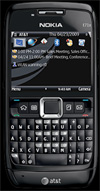 I was pumped when I heard that the Nokia E71x on AT&T was finally available. I’d tried the unlocked Nokia E71 (the model without the “x”) and thought it was great. All indications from AT&T were that the E71x would be even better than the unlocked E71 because it would be loaded with additional software. I figured this was as close as anyone could get to being an “iphone killer” – QWERTY keyboard, compatability with the new Nokia Messaging 1.1 client, great hardware and more… What could be better than ‘the world’s thinnest smartphone’ packed with new software?! Apparently, quite a lot… Much to my dismay, the Nokia E71x from AT&T isn’t actually as useful as the unlocked E71 because it (gasp) doesn’t sync with a Mac!
What a let down to discover after all these months of anticipation that there is NO MAC COMPATABILITY with the E71x! There’s no indication anywhere on the box or in the literature inside that that you need a PC. I found out the hard way…
I was one of the first to order the Nokia E71x through AT&T when it was made available on Monday. The phone arrived at my office yesterday afternoon, and after a night of charging, I started device set-up this morning. Having owned a number of Nokia devices in the past – including the N95 (which syncs beautifully with a Mac), I cracked open the box with great anticipation. I opened the “Getting Started Guide” and was surprised to see that the section called, “Sync Your Phone with Your Computer” was only listed at the very end of the guide – on page 31. (Could it have been an after thought?) When I got to the appropriate section, there was no mention of how to sync your calendar and contacts on your computer with the E71x. The only syncing issue the guide addresses is how to, “Transfer Music and Other Files From Your Computer”. I dug deeper… According to the getting started guide, there was a “compatible version of Nokia PC Suite” in the box. There isn’t. Someone managed to forget to insert the CD into the box. (Thank you, AT&T!)
Since the “Getting Started Guide” wasn’t much help, I turned to the more robust “User Guide”. AT&T has very helpfully provided the “user guide” in both English and Spanish. Unfortunately, syncing instructions are still vague, regardless of what language you speak. I flipped to the index, and much to my surprise, it didn’t even mention the word “sync”. So, I went to the “Contents” page, where I found the word “sync” buried deep within the options under “Settings” (not exactly convenient).
As with the “Getting Started Guide” the “User Guide” was equally unhelpful in explaining how to sync the device with a computer. On page 41, the only information I could find on syncing was a single paragraph that says a whole lot of nothing:
“Sync enables you to synchronize data such as your calendar entries, contacts and notes with a compatible computer or a remote internet server using a Bluetooth Connection: Select Menu> Settings > Sync. To create a new profile, select Options> New sync profile and enter the required settings. To synchronize data, in the main view, mark the data to be synchronized and selection Options> Synchronized.”
Er – I tried that, and nothing happened. I searched the index and contents pages for the mention of computer compatibility – nothing. Noting that the other Nokia phones I’ve used require Nokia’s iSync software to work with the Mac, I went to the iSync site. iSync supports the E71 (sans “x”), and I installed the plugin to the iSync client on my Mac. Unfortunately, the E71 plugin didn’t recognize the E71x device. So, I called AT&T, who sent me through a nightmarishly complex maze of customer service interactions…
I spent 30 minutes on the phone with AT&T, talking to various customer service agents who had no idea what they were talking about. One even told me that AT&T only supports mac on a very basic level and inferred that my best smartphone option was to get an iPhone 3G (which, as I’ve noted before, I don’t want). I was transferred to a manager, who empathized with my frustration. (Note to all customer service staff: even if you have no idea what you’re talking about, it’s always a good idea to be nice to the customer and pretend to care about their concern.) I was told that AT&T recently underwent a re-organization of their customer service function, and now when one department has to escalate a concern to another department, they can’t talk in person, they’re relegated to IM chat with an agent the other department, who is presumably multitasking with multiple IMs to different departments at the same time and is therefore very slow.
The manager I talked to was very nice. She expressed frustration with this new process and suggested she’d give me a call back with the answer within the hour once she got an answer. Much to my surprise, she called back, as promised. AT&T alegedly phoned Nokia customer service center. The response: “Syncing the E71x to Mac is impossible.” HUH?!@ How can it be “impossible”? If syncing on a Mac works with the Nokia E71, why can’t it work with the Nokia E71x? Sounds implausible to me, but hey…Now, I’m sitting here, staring at the phone I’ve anticipated owning for months, but it’s unuseable. Sigh.
In a last ditch effort to prove AT&T wrong, I’ve emailed MarkSpace to see whether their MissingSync solution for the E71 will work with the E71x. I’ll keep you posted. In the meantime, if you’re a Mac user, give the E71x a miss, and wait for the next iphone – rumored to be coming out this summer.
11:24PM May 7: UPDATE. If you want to see a great post on the other differences between the E71 and E71x, check out this post from Noah Kravitz’s blog.
12:08PM May 12: UPDATE: I returned my E71x to the AT&T store yesterday and am buying an unlocked E71 from Amazon for $332. That way, if Apple releases a new iPhone this summer, I’ll still be eligible for an upgrade. Based on what I read in this post from Noah Kravitz and my conversations with other mobile gurus, this seems like a good choice. As a further update – In the comments below, one reader mentions that he’s now able to get iSync to working with the E71x. Also, MarkSpace says MissingSync works with the E71x.
17 Responses to “Nokia E71x from AT&T can’t kill iPhone because it won’t sync to Mac.”
Leave a Reply


Are you trying to sync E71x –> iCal?
If so, I've got a solution for you: Google Cal. Both support IMAP sync. Plus puts your calendar online for you as well, so you can access it anywhere.
You can sync your iCal to Google Cal & your E71. Been doing it for months now. Sometimes the E71 doesn't sync properly, but I sync it a couple times a day, and usually works half the time.
Thanks, Brian. I'm trying to sync calendar, contacts, photos, music, etc. I'd use Google Cal, but I like having an offline calendar. And, unfortunately, it doesn't solve my contacts syncing problem.
Actually, I could sync my E71x with my MBP. The only thing that I could not do was download text messages. I downloaded an iSync patch for the E71 from the Nokia Europe website.
Hmmm… I downloaded the E71 iSync plug-in from Nokia's European site early last week, and it didn't work with my MacBook Pro. AT&T told me the E71x wasn't Mac compatible or compatible with iSync. My complaint was escalated, so perhaps they fixed it to work with the E71x?
MarkSpace replied to my query and says MissingSync supports the E71x. So, that could be a good option for users that are having trouble with iSync.
Given my experiences with the E71x so far and other reviews I've seen, I'm returning my E71x to AT&T and buying an unlocked E71. That way, if Apple comes out with the rumored new iPhone this summer, I'll be able to upgrade under the AT&T subsidy. As an added bonus, AT&T actually supports Mac users that buy an iPhone.
I got it to work also with the iSync plug-in for e71. just make sure iSync is closed when installing! very important!!
I am able to sync my e71x with my MacBook iCal, Address Book, etc. just fine. You just need to load the e71 plug in.
Sounds like it's working fine now. The E71 plugin wasn't working for me on the second day that the E71x came out. At the time, AT&T told me syncing the E71x with a mac wasn't possible, and they claimed to have consulted with Nokia. It's clear from the comments though, that it's now working. I ended up buying the E71 unlocked from Amazon, and returned the E71x. The unlocked E71 comes with better accessories than the E71x and it syncs just fine.
If you live by my store i would have made it work for you… if you can ever make it to my store I can usually solve or explain most mobile issues and i'm very good with work-a-rounds for mac users.
Does the missingsync WORK???? There is a version of missing sync for the e71x that apple told me about. The CD cost $60 online. Can anyone confirm this before I purchase. I did get the PC suite to sync my e71x to my PC. But I am a mac user. Help would be appreciated.
Hi Chris, can you tell me what your settings are in your address book and on the phone? I've dl's the plug in, I made sure iSync was closed. I have my phone paired to my iMac running 10.4.11. Te iMac is a trusted device. When i watch the sync take place for the first time I'm told that the contacts were sync'd but don't see any contacts on my phone. Mean while all the calendar appts/notes/entries show up no problem.
Or is there a site where all the settings are detailed?
Thanks so much
Nice to hear about this i am using the Unlocked Nokia E71 In the Network AT&T..I found the Unlocking instructions in the site Unlocking Instructions @free of cost @free of cost..I want the Unlocking code can anyone Get it to me..
umm actually you can sync with the mac. download the e71 iSync drivers and bluetooth sync it, it works like a charm for me.
Yep – As I mentioned above, and by others' accounts, it's working now. It wasn't the first few days the device was out. I bought the E71 unlocked version in the end, and like it better than the E71x.
http://reviewallnokia.blogspot.com/2009/09/noki…
the Nokia cost approximately $60.00 with a renewed contract with AT&T, something I also felt was well worth it. The phone is amazing. Best phone I ever had.
r4i software
http://reviewallnokia.blogspot.com/2009/09/nokia-e71x.html?showComment=1262753225376_AIe9_BEMzw5x0aFWloyHiXHKjzFu-UtiGZwK21D8JGnIzifgvnegj4cuzMONS4jss33A0Oc2sDfWRyzhK62lwYdR4yzCHbeomlYd30e8gmSlSm8Tt8XIVO62hpWE591NoDrs7aB9a0zuVNZ2T4CySmGNytHuCL9IYgTZMuANZ9EL05cu7bF-NDmf4IxzHE63t2hu-eiQKWO8cT3th3S78h422CBD_Lautk68SlW_mFChoJjQ5O4FxBA#c3577699052894324916
the Nokia cost approximately $60.00 with a renewed contract with AT&T, something I also felt was well worth it. The phone is amazing. Best phone I ever had.
r4i software